Social Media Image Sizes 2026 — Every Platform & Format | ImageTools Blog

Social Media Image Sizes 2026
— Every Platform

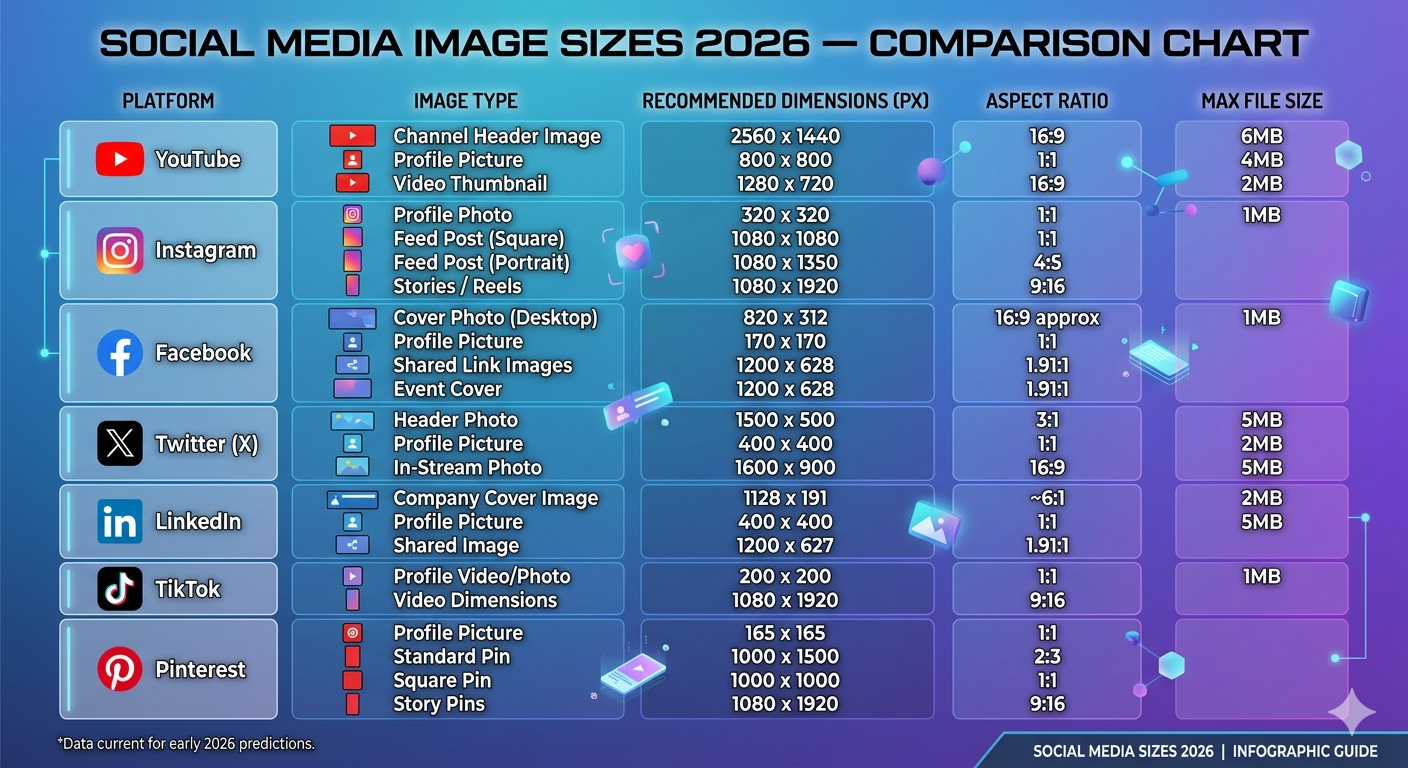
Bookmark this page — it has every social media image size for 2026 across all major platforms. YouTube, Instagram, Facebook, Twitter/X, LinkedIn, TikTok, Pinterest, and Discord — all dimensions in one place, updated for 2026.

Social media image sizes 2026 — getting dimensions wrong means your images get cropped, stretched, or look blurry. This guide has the correct size for every platform and every image type.

🖼️ Resize to Any Social Media Size Instantly

Our Thumbnail Generator has all platform presets built in — select your platform, upload your image, export all sizes at once.

▶️
YouTube
Thumbnails are critical for click-through rate
Channel Banner
2560 × 1440
16:9 • Max 6MB
Safe zone for all devices: 1546×423px centered. Keep logos in this area.
Profile Picture
800 × 800
1:1 • PNG
Displays as circle. Keep logo centered with padding around edges.
💡

YouTube Thumbnail Tips

Thumbnails with faces, bold text, and high contrast consistently get higher click-through rates. Keep important content away from the bottom-right where the duration overlay appears. For official specs see YouTube’s official channel art guidelines.

📸
Instagram
Visual-first platform — image quality is everything
Feed — Square
1080 × 1080
1:1 ratio
Classic Instagram format. Good for product shots.
Stories / Reels
1080 × 1920
9:16 ratio
Full screen vertical. Keep text in center 1080×1420px safe zone.
Profile Picture
320 × 320
1:1 • PNG
Displays as circle at 110px. Keep subject centered.
⚠️

Instagram Compression Warning

Instagram heavily compresses images over 1MB. Compress to under 1MB before uploading using our Image Compressor. Use sRGB color profile — other profiles get color-shifted.

📘
Facebook
Different sizes for profiles, pages, and ads
Feed Post
1200 × 630
1.91:1 ratio
Standard feed image. Same as Open Graph size — great for blog shares.
Stories
1080 × 1920
9:16 ratio
Same as Instagram Stories. Safe zone: center 1080×1420px.
Profile Picture
180 × 180
1:1 • PNG
Displays as circle. Upload at 180px minimum for sharp results.
🐦
Twitter / X
Microblogging — images expand on click
Header / Banner
1500 × 500
3:1 • Max 5MB
Keep profile picture area (bottom-left) clear.
Profile Picture
400 × 400
1:1 • Max 2MB
Displays as circle. PNG for logos, JPG for photos.
💼
LinkedIn
Professional network — polished, brand-consistent images
Company Cover
1128 × 191
~6:1 ratio
Very wide and narrow. Simple designs with logo and tagline work best.
Feed Post
1200 × 627
1.91:1 ratio
Standard post image. Square (1200×1200) also works well on mobile.
Article Cover
1200 × 644
~1.86:1 ratio
Appears at top of LinkedIn articles and in feed previews.
🎵
TikTok
Short-form video — vertical format dominates
Photo Post
1080 × 1350
4:5 ratio
Carousel photo posts. Same as Instagram portrait. Max 35 photos.
Profile Picture
200 × 200
1:1 • JPG/PNG
Displays as circle. Upload at 200px+ for sharpness.
📌
Pinterest
Discovery platform — tall images perform best
Story Pin
1080 × 1920
9:16 ratio
Full screen vertical. Keep text in center safe zone.
Profile Picture
165 × 165
1:1 • PNG
Upload at 800×800 for retina sharpness — Pinterest scales it down.

⚡ Quick Reference — All Social Media Image Sizes 2026

PlatformKey SizeTypeMax File
▶️ YouTube1280×720Thumbnail2MB
📸 Instagram Feed1080×1350Portrait post30MB
📸 Instagram Stories1080×1920Stories/Reels30MB
📘 Facebook Feed1200×630Link share30MB
📘 Facebook Cover820×312Page cover100KB
🐦 Twitter/X Post1600×900Tweet image5MB
🐦 Twitter/X Header1500×500Profile banner5MB
💼 LinkedIn Banner1584×396Personal header8MB
💼 LinkedIn Post1200×627Feed image5MB
🎵 TikTok1080×1920Video/thumbnail
📌 Pinterest Pin1000×1500Standard pin20MB
🌐 Open Graph1200×630Link previews8MB

📐 Resize to Any Social Media Size Instantly

Free tools handle all resizing, cropping, and compression — no design software needed.

Frequently Asked Questions

1080x1350px (4:5 portrait) is best for 2026 — it takes up more feed space than square, leading to better engagement. For square posts use 1080x1080px. Instagram displays at max 1080px width so there’s no benefit to uploading larger.
YouTube thumbnails should be 1280x720px (16:9 ratio), under 2MB. JPG, PNG, or WebP. Always use 1280px for sharpness. Keep text large — thumbnails appear very small in search results.
Facebook cover displays at 820x312px on desktop and 640x360px on mobile. Use an 820x360px image and keep key content centered to ensure it looks good on both devices.
LinkedIn personal profile banner is 1584x396px (4:1 ratio). Company page cover is 1128x191px. Your profile picture overlaps the bottom-left corner — keep key content away from that area. Max 8MB, JPG or PNG.
JPG works on all platforms and is best for photos. PNG is best for graphics and text-heavy images — better quality after platform compression. WebP is supported by Instagram, Pinterest, and Twitter and gives the smallest file sizes. Avoid GIF for still images.
📐
ImageTools Editorial Team

We build free, privacy-first image tools for designers, developers, and content creators. All tools run entirely in your browser — your images never leave your device.

Related Articles

Share.
Leave A Reply