
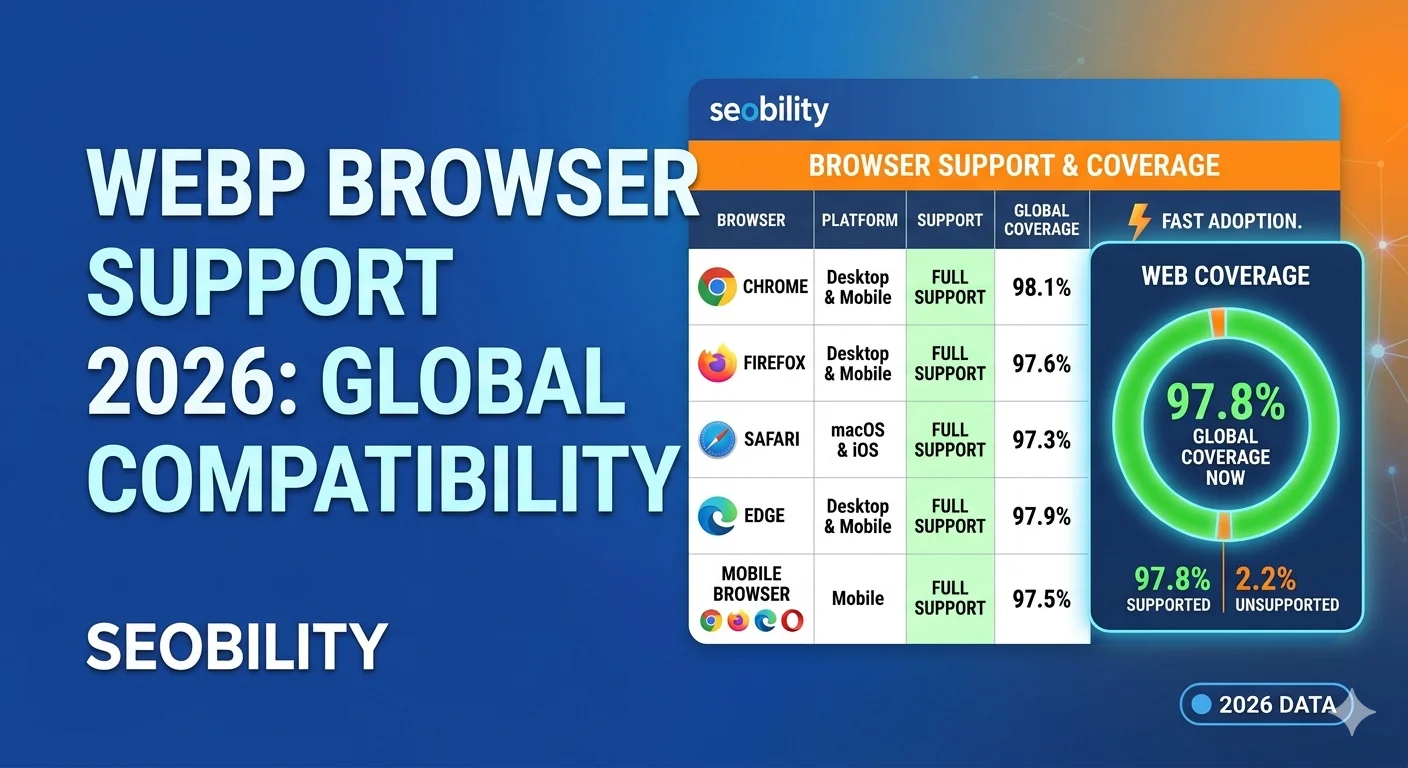
WebP Browser Support 2026:
Is It Safe to Use?
WebP browser support in 2026 has reached over 97% globally — making it safe to use on virtually every website without fallbacks. Here’s the full compatibility breakdown, the Safari story, and exactly when maintaining a JPG fallback is still worth it.
📋 Table of Contents
The 2026 Verdict: Yes, Use WebP
The short answer: yes, WebP browser support in 2026 makes it safe to use everywhere. With 97%+ global coverage, the only users who can’t view WebP are on extremely outdated software — primarily Internet Explorer 11 and iOS Safari older than version 14 (released 2020).
For the vast majority of websites, the performance gains from switching to WebP far outweigh any compatibility concerns. Google itself recommends WebP in PageSpeed Insights and Core Web Vitals guidance.
WebP Browser Support 2026 — Full Compatibility Table
| Browser | WebP Support Since | Market Share 2026 | Status |
|---|---|---|---|
| Chrome (desktop + mobile) | Version 32 — Jan 2014 | ~65% | ✅ Full |
| Safari (macOS + iOS) | Version 14 — Sep 2020 | ~19% | ✅ Full |
| Firefox | Version 65 — Jan 2019 | ~3% | ✅ Full |
| Edge (Chromium) | Version 18 — Oct 2018 | ~4% | ✅ Full |
| Samsung Internet | Version 4 — 2016 | ~3% | ✅ Full |
| Internet Explorer 11 | Never | <0.5% | ❌ None |
| iOS Safari < 14 | N/A | <1% | ❌ None |
The Safari Story
Safari’s lack of WebP support was the biggest blocker for years. Apple resisted adopting WebP — a Google-developed format — until 2020, when Safari 14 finally added full WebP support alongside macOS Big Sur and iOS 14.
By 2026, Safari 14+ has been the minimum iOS version for years. The percentage of iPhone and Mac users still on pre-Big Sur software is under 1% of Safari traffic globally.
Safari is No Longer a Blocker
The Safari WebP support issue is a thing of the past. If you’ve been avoiding WebP because of old Safari advice, that advice is now outdated. All current Safari versions fully support WebP browser support 2026 and beyond.
How Much Smaller is WebP?
WebP consistently produces smaller files than JPG and PNG at comparable visual quality. For a typical 1200×800 photo:
When & How to Use Fallbacks
For most websites in 2026, you don’t need WebP fallbacks. With 97%+ support, maintaining two copies of every image isn’t worth it for less than 3% of users.
When Fallbacks Are Still Worth It
- Your analytics shows significant IE11 traffic (corporate intranets, government tools)
- You serve users in regions with slower browser update cycles
- Your site serves specialized audiences with older hardware/software
The Correct Fallback: <picture> Element
WordPress & CMS Users
Most modern WordPress image optimization plugins (Imagify, ShortPixel, Smush) automatically serve WebP with a JPG fallback using the <picture> element. You don’t need to handle this manually — just enable WebP conversion in your plugin settings.
WebP Lossy vs Lossless
| Mode | How It Works | Best For | Transparency? |
|---|---|---|---|
| WebP Lossy | Discards some data (like JPG) | Photographs, hero shots | No |
| WebP Lossless | Preserves all data (like PNG) | Logos, UI graphics, screenshots | Yes |
| WebP with Alpha | Lossy + transparent alpha | Product photos on white | Yes |
Simple Rule
If you’d normally use JPG → use WebP lossy. If you’d normally use PNG → use WebP lossless. If you need transparency in a photo → use WebP with alpha.
How to Convert to WebP
Converting your existing JPG and PNG images to WebP takes seconds with our free browser-based tools:
- JPG to WebP — convert JPEG photos to WebP lossy (typically 25–35% size savings)
- PNG to WebP — convert PNG graphics to WebP lossless (preserves transparency)
- WebP to JPG — convert back to JPG when needed for email or print
- WebP to PNG — convert back to PNG for editing in older software
🔁 Convert JPG / PNG to WebP Free
Browser-based, no upload, no sign-up. Convert instantly and download at full quality.
Frequently Asked Questions
For the most up-to-date WebP compatibility data across all browsers, see caniuse.com WebP support data — the most comprehensive browser compatibility tracking resource available.
